See every track’s status on every platform.
A music catalogue app for producers working with stock sites, libraries and distributors. Import your spreadsheet, track upload statuses and manage all your track details.A music catalogue app for producers working with stock sites, libraries and distributors.
Free for 14 days of use. No account, no card. Pay once, from $39.
Made by Ivan Ryzhko, a composer with 300+ tracks on audio stock. Updated 8 times since September 2026.
- EnvatoLive
- ArtlistReview
- DistroKidTo upload
- IdentifyyReject
- PROLive
One dot is one status.
For Mac and Windows. Free 14-day trial. From $39, buy it once.
Made by Ivan Ryzhko, a composer with 300+ tracks on audio stock. Updated 8 times since September 2026.
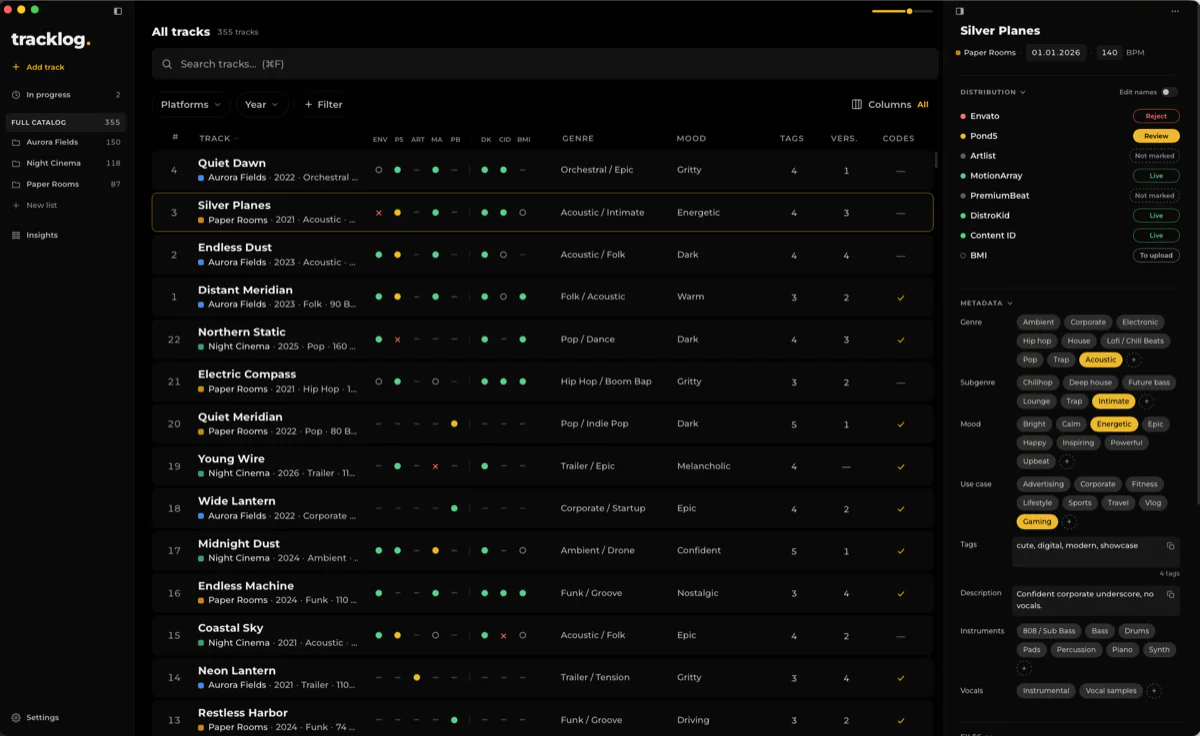

Keep everything about a track in one place.
Bring your spreadsheet. Nothing to re-type.
Import your existing Excel or CSV file, including spreadsheets exported from Google Sheets. tracklog helps match your columns, platforms and statuses. Review the result before importing. Your original file stays unchanged.
Find tracks you still need to upload.
Which tracks are not on DistroKid yet? Which ones are still in review?
Filter by platform and status to find the tracks you need. Update their statuses as you work.
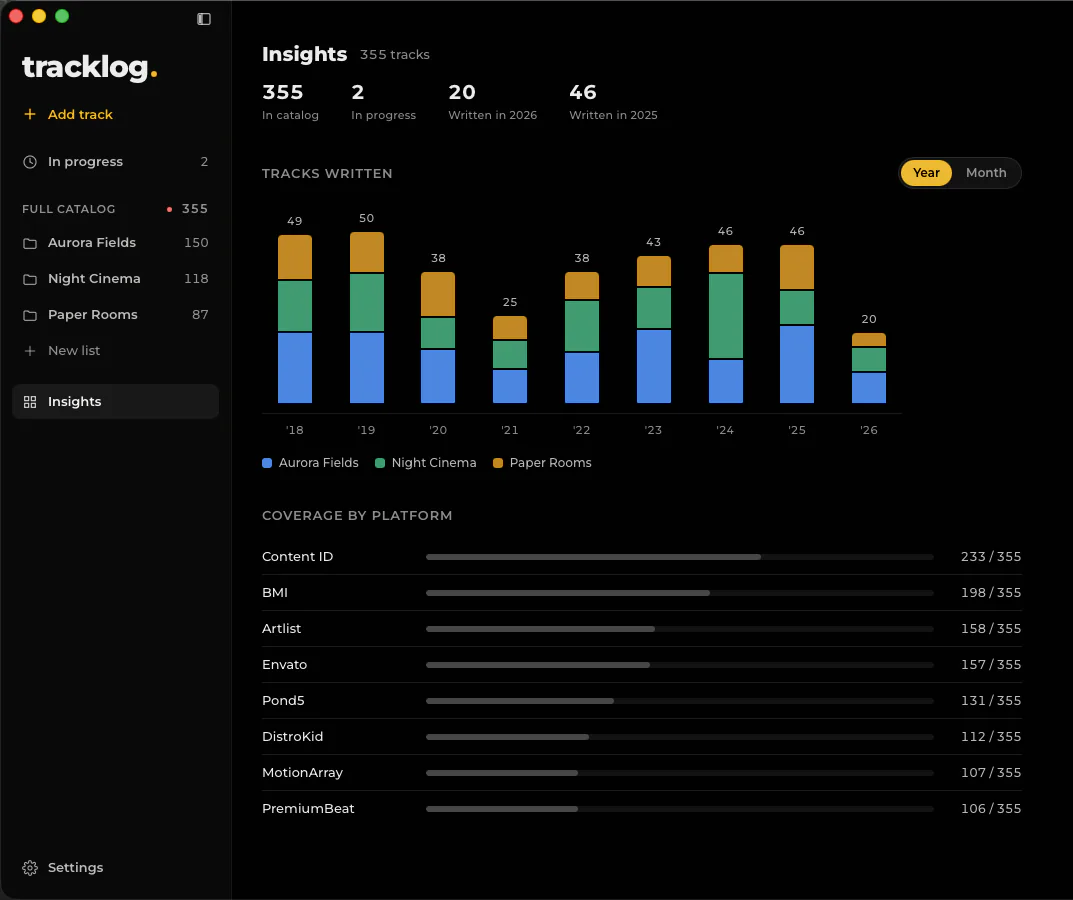
How much of my catalogue is on each platform?
How many tracks you have, and how many of them are on each platform.
See when a title repeats.
tracklog tells you when two tracks in your catalogue have the same name. Rename one, or keep both. Useful before you offer a track as exclusive anywhere.
Built by a music producer
I'm a composer with 300+ tracks on music stock sites. I managed my catalogue in a spreadsheet for years. It worked, but keeping track of platforms, statuses and different track details became harder as the catalogue grew.
I built tracklog for my own music, and I use it every day.
Try it on your own catalogue.
For Mac and Windows. Free 14-day trial. From $39, buy it once.
Bring your spreadsheet. Nothing to re-type.
Import your existing Excel or CSV file, including spreadsheets exported from Google Sheets. tracklog helps match your columns, platforms and statuses. Review the result before importing. Your original file stays unchanged.
No spreadsheet? Start from your folders.
Point tracklog at a folder of tracks. Each file becomes a track, with its name and length. Then mark where each one is uploaded.
Find tracks you still need to upload.
Which tracks are not on DistroKid yet? Which ones are still in review?
Filter by platform and status to find the tracks you need. Update their statuses as you work.
Find a track by any of its names.
Search by the name a track has on any platform, by an old title or by its number. If no track has the name, tracklog says so.
Keep everything about a track in one place.
Titles, genres, tags, versions, ISRC codes, notes and platform-specific details. Open a track to find what you need when preparing your next upload.
How much of my catalogue is on each platform?
How many tracks you have, and how many of them are on each platform.
Fill upload forms in one click.
Open a track's card next to your browser. Click a field in the upload form, then the value in the card. Title, tags and description go straight in.
See when a title repeats.
tracklog tells you when two tracks in your catalogue have the same name. Rename one, or keep both. Useful before you offer a track as exclusive anywhere.
Built by a music producer
I'm a composer with 300+ tracks on music stock sites. I managed my catalogue in a spreadsheet for years. It worked, but keeping track of platforms, statuses and different track details became harder as the catalogue grew.
I built tracklog for my own music, and I use it every day.
Try it on your own catalogue.tracklog is an app for Mac and Windows.
tracklog is an app for Mac and Windows. Free for 14 days of use. No account, no card. Pay once, from $39.
No cloud. Your catalogue never leaves your computer.