Help
Something broke, or you have a question or an idea. How to tell us, where your catalog is stored, and answers to common questions.
Report a problem
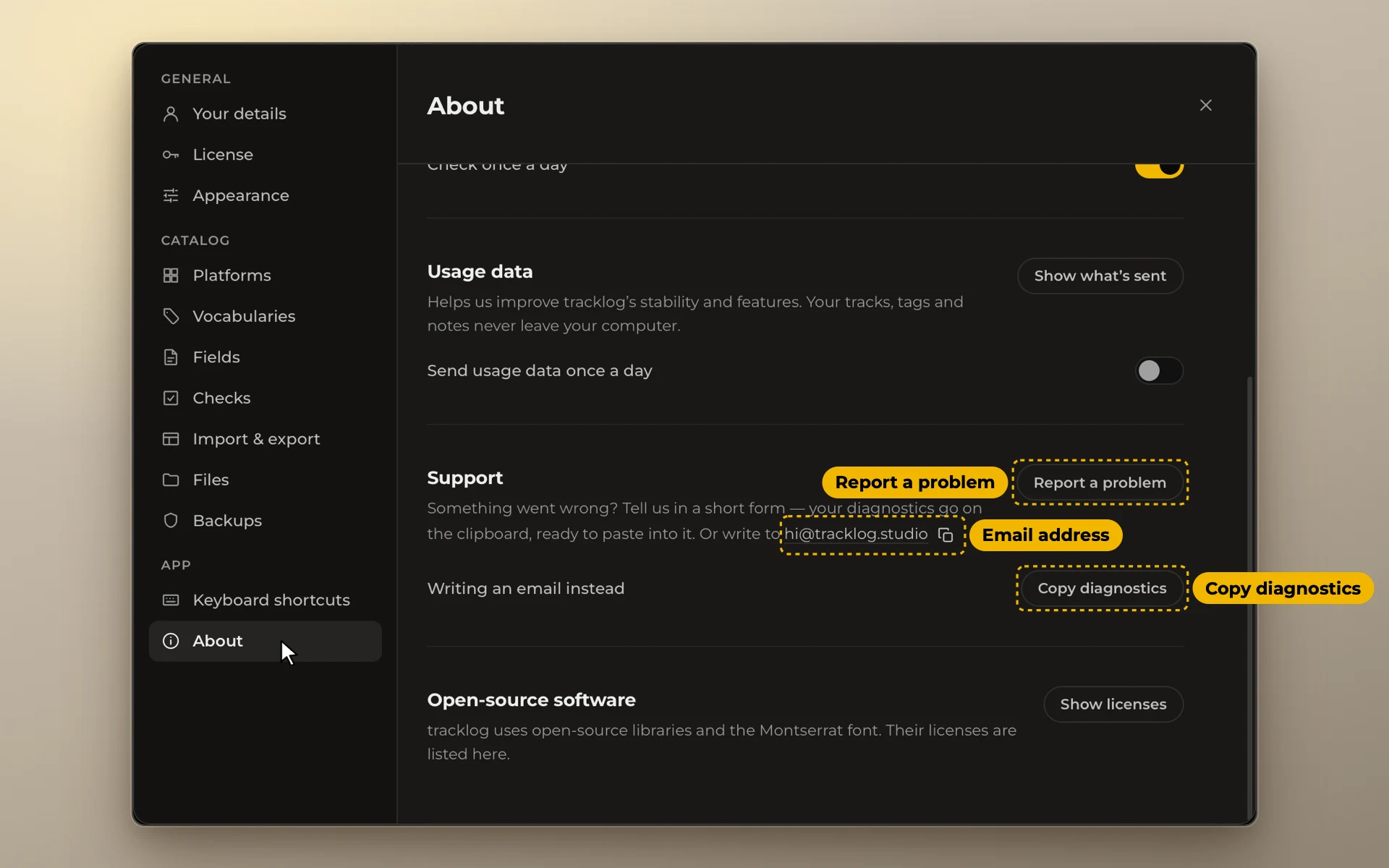
Open Settings → About and click Report a problem. It copies the diagnostics for you and opens the report form with your version already filled in. One bug or one idea per report.
Write to us
Write to hi@tracklog.studio. If something broke, click Copy diagnostics in Settings → About and paste it into the email.
Where your catalog is
Your catalog is stored on your computer. tracklog doesn't send it anywhere.
- On a Mac:
~/Library/Application Support/com.vicate.tracklog/ - On Windows:
%APPDATA%\com.vicate.tracklog\. Paste this into the address bar of File Explorer to open it.
The catalog is the file vicate-tracks.db. Backups are in the backups folder beside it.
Questions
Click a question to see the answer. Questions about prices and licenses are answered on the Pricing page.
Install
Does tracklog work on an Intel Mac?
No. tracklog needs a Mac with Apple silicon (M1 or newer) and macOS 11 or later. If your Mac has an Intel chip, write to hi@tracklog.studio. These emails help us decide whether to make a version for Intel.
Can I try tracklog without installing it?
Yes. tracklog.studio/try opens the app in your browser with a made-up catalog. You can load your own spreadsheet there. It is read inside the browser tab and is not sent anywhere. When you refresh the tab, everything starts over.
Is there a version for a phone, an iPad or Linux?
No. tracklog works on Mac and Windows only. If you open the site on a phone, it suggests opening it on a computer.
Is tracklog only in English?
The app is in English for now. Titles, genres and tags can be in any language. tracklog keeps them exactly as you typed them.
Your data
Where is my catalog stored?
On your computer, in one file. Backups are in a folder next to it. The folder for Mac and for Windows is in Where your catalog is above.
Does tracklog send anything to the internet?
Your catalog never leaves your computer. Once a day tracklog checks for updates. This check sends only your system, your processor type and the app version. You can turn it off in Settings → About.
Usage data is sent only if you said yes to it. It is counts only, never anything from your catalog. To see it word for word, open Settings → About and click Show what's sent.
When you enter a license key, tracklog activates it online once.
How often does tracklog make backups?
Every time it starts. Also before an import, before an update and before you restore a backup. The last 15 backups are kept. A backup holds your catalog, not your audio files. See Backups.
Can I keep my catalog in iCloud or Dropbox?
Not the catalog itself. Cloud sync can damage it. Put your backups there instead: open Settings → Backups, click Choose folder… and pick the cloud folder. See Keep copies in a second place.
What if my catalog doesn't open?
tracklog shows "Your catalog didn't open". The main button there restores your last backup. Click Details to copy a report for us. There is also a button that opens the folder with your data.
Does tracklog store my audio files?
No. tracklog doesn't copy your audio files. When you add tracks from a folder, it reads only the file names, the versions and their lengths. See Import a folder.
Track files and the player come in the next update. Then tracklog knows where the files of each track are: its project, versions and stems. It plays them from there. Your files stay where they are. See Link your files and Listen to your tracks.
Can an update break my catalog?
Before an update, tracklog makes a backup and checks it. If the backup fails, the update doesn't start. The update changes only the app, not your catalog.
Import
Which files can I import? What about Google Sheets and Numbers?
CSV, Excel (.xlsx, .xls, .xlsm, .xlsb) and OpenDocument (.ods). From Google Sheets, use File → Download and choose CSV or .xlsx. From Numbers, export to Excel or CSV first.
There is no live link to Google Sheets. An import brings the data in once. See Import a spreadsheet.
My spreadsheet is messy: colours, links, merged cells, my own words.
Merged cells in .xlsx files are filled in. Cell colours and links inside cells are not brought in. The import window tells you when your file has them.
Words tracklog doesn't know, like "in work", become Not marked. The import window shows them. Columns tracklog is not sure about are yellow, so you can check them.
My spreadsheet isn't in English.
tracklog finds columns by English words and by what is in them: ticks, tempo, dates. If a column is not found, you choose in the import window what it becomes. Nothing is dropped without telling you.
Working with the catalog
Does tracklog upload tracks to stock sites or track sales?
Not yet. An assistant that uploads tracks for you is in development. Today you mark statuses yourself.
A small window helps with uploads. Click a value in it to paste the title, BPM or tags into the site's form. See Fill mode and focus window. tracklog doesn't track sales.
Can I add my own platform and my own fields?
Yes. Add a platform in Settings → Platforms. Add a field in Settings → Fields with New field. There are ready fields for codes like ISRC and ISWC.
A track has a different title on different sites.
Open the track card and turn on Edit names. Type the other name under that platform. Search finds the track by any of its names, and the duplicate check uses all of them. See Track card.
Can I use one catalog on two computers?
There is no sync. Each computer has its own catalog file. To move the catalog, click Save a backup… on one computer and Open a backup… on the other. Changes made on two computers are not merged. There is no shared access. See New computer.
Updates and trial
How does tracklog update?
Once a day it checks for a new version. If there is one, it shows what's new with Update and Later. To check yourself, open Settings → About and click Check now.
Does reinstalling start the trial again?
No. tracklog counts the days it was open, and reinstalling doesn't reset them. To see how many days are left, open Settings → License.
What happens to my catalog when the trial ends?
It stays. Viewing, search, export and backups keep working. You can't add or change tracks. A license key brings everything back.
Windows
Windows says "Windows protected your PC". Is it dangerous?
The Windows app is not signed with a paid certificate, so Windows warns you as it does with any app it doesn't know. Click More info, then Run anyway.
Before that, Edge may say the file isn't commonly downloaded. Click the three dots, then Keep. Every step is in Install on Windows. tracklog needs Windows 10 (version 1809 or later) or Windows 11, 64-bit.
Does everything work the same on Windows?
Yes. Where a Mac uses ⌘, Windows uses Ctrl: Ctrl+Z undoes and Ctrl+Y redoes. The fill window for uploads works on Windows too.