DISCO and tracklog: what each one does and when you need both
If you pitch music for sync, someone has probably told you to get DISCO. Here is what it does, what it doesn't do, and where tracklog fits in.
In short. DISCO is a cloud service for sending music to people. A link with a player, downloads, and stats on who listened to what. When you pitch songs to music supervisors, it is the standard. tracklog is an app on your computer. It remembers where each track is: on which stock sites, with which distributors and libraries, under which title, and in what status. If you pitch, you will use both. If you sell on stock sites and release music through a distributor, start with tracklog. You will need DISCO later.
What DISCO is
DISCO (disco.ac) is a cloud service for music you show to someone. It was built by a music supervisor. Most of its users are music supervisors, labels, publishers, and composers who work in sync.
How it works:
- You upload finished tracks. DISCO reads the data in the files. Versions sit under one track: the instrumental, cutdowns, stems.
- You build a playlist for a specific person or library.
- You send a link. The person opens it on their phone, and it plays at once. They can download the WAV and save the playlist to their own DISCO.
- You see who opened the link, what they played, and what they downloaded.
Music supervisors do ask for a DISCO link. One music industry executive explained why:
"As an executive it's what I prefer to receive. The mobile streaming site is the main thing for me."
What it costs. The plan for artists is $10.80 a month, billed yearly, with no limit on files. Plans for companies start at $16.99 a month for one person and 1,000 files. AI tags, similar-track search, and a public catalog for music supervisors cost extra, from $10 a month. These are DISCO's prices in October 2026.
Where DISCO is strong
- The link people expect. A music supervisor gets a page they know and doesn't lose time on an unfamiliar player.
- You see who listened. Each person you send to can get their own link and their own stats.
- Versions and stems under one track. The instrumental and the cutdowns don't get lost. More on this in versions, cutdowns and stems.
- Data inside the file. When someone downloads a track, DISCO writes the title, the ISRC, and the rest into the file.
"Every music supervisor I work with is on there and ask me to send things through disco."
If you send music to people, DISCO does it well. tracklog doesn't try to replace it.
What DISCO doesn't do
DISCO answers the question "where do I send this track, and who listened?" It doesn't answer "where is this track already?" It was built for something else. That is why many people keep a spreadsheet or a database next to it. Here is advice from a musician who pays for DISCO:
"Have a good database. I use Airtable… Put all your track data and album art and descriptions and pitches in there."
What is missing when a track lives in many places:
A status on each platform. A track is live on Motion Array, waiting for review on AudioJungle, rejected by one library, and not yet released through DistroKid. In DISCO, you have notes for this and, on the Pro plan, up to three coloured labels per track.
Different titles on different platforms. Non-exclusive libraries retitle tracks. A question about it on Reddit got no answer:
"You rename the track differently for each library… does DISCO support multiple entries of the same track?"
Exclusivity. If a track is exclusive to one library, you need to see it at once. Otherwise, this happens:
"They thought the songs I've already had placements with were available but it was exclusive."
The list of places a track went to. For DISCO, stock sites, distributors, and PROs are the outside world. DISCO itself is one of the places a track goes to.
What tracklog does
tracklog is an app for Mac and Windows. The catalog stays on your computer. No account, no cloud.
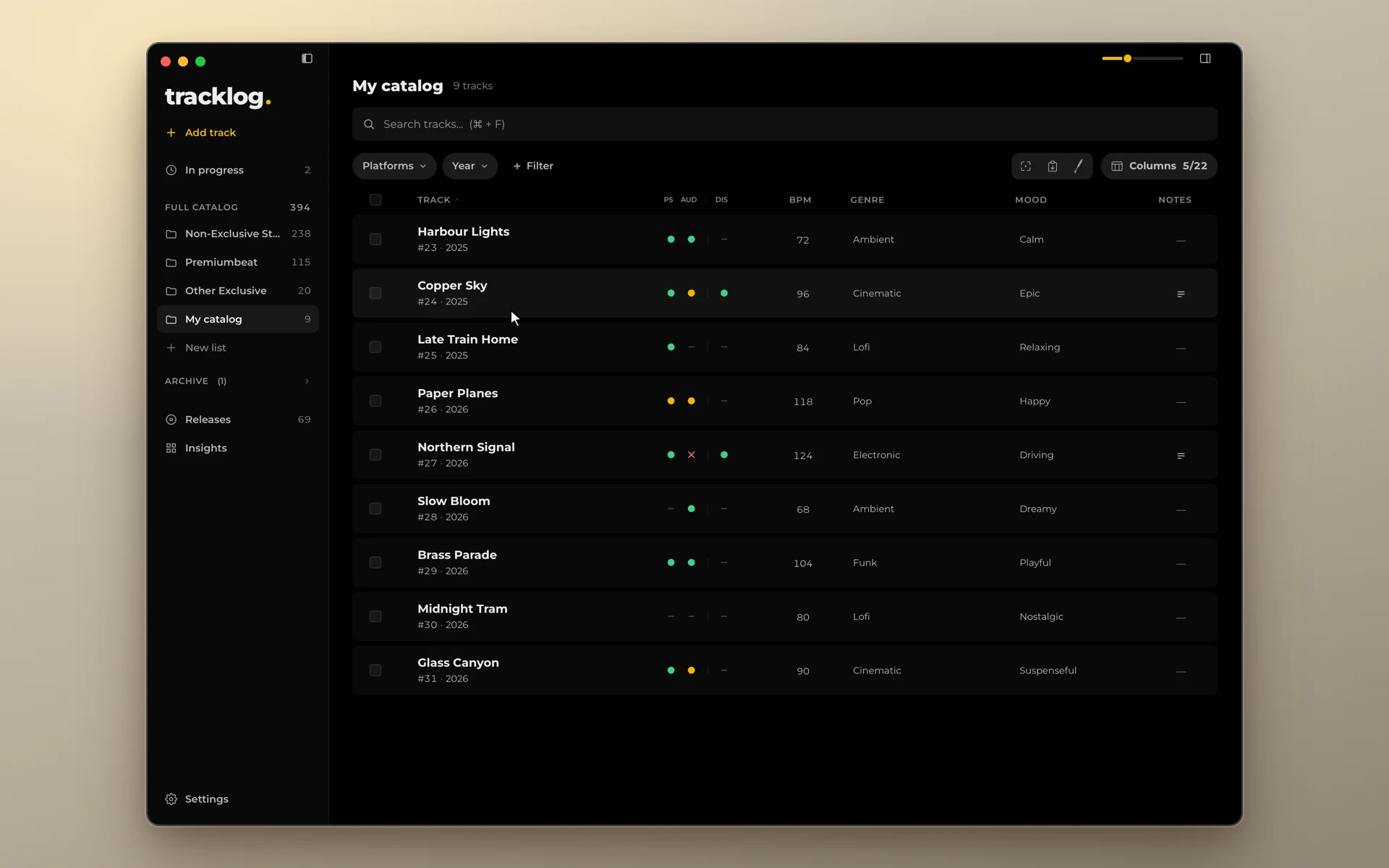
- A status matrix. A row is a track, a column is a platform, a dot is the status: live, to upload, in review, rejected. One look is enough.
- Titles on platforms. A track has one main title, and its own name on each platform where it was renamed.
- Versions from the folder. The app finds the instrumental, the cutdowns, and the stems in the track's folder by itself.
- Releases. Singles, EPs, albums, and packs, with a date, a UPC, and a link.
- Your own checks. For example "Exclusive", "Stems exported", "Mastered". A tick on the track.
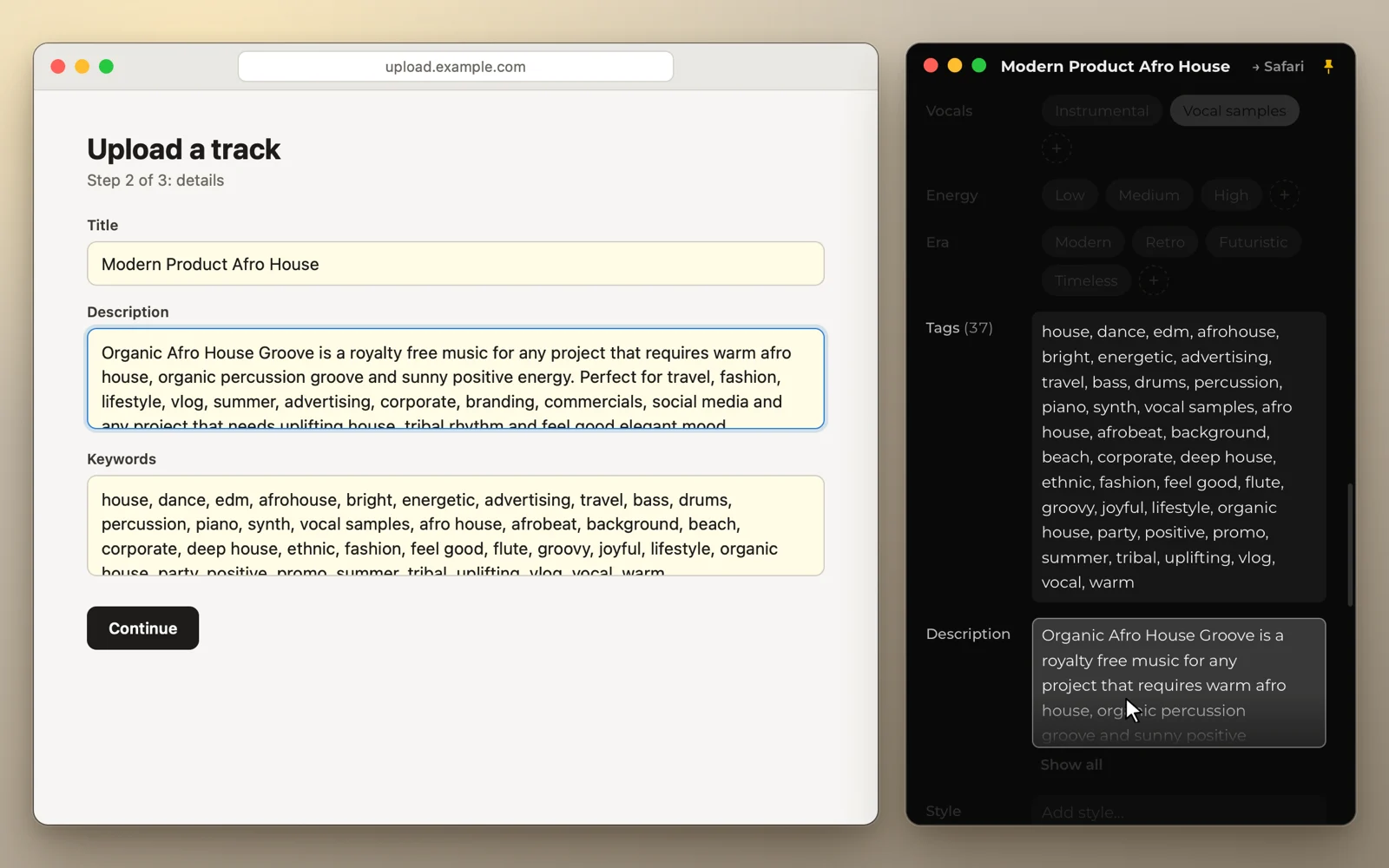
- Fill mode. One click pastes a value from the track card into the form of any platform. Into DISCO's metadata form too.
- Spreadsheets both ways. Import any spreadsheet, and export to CSV at any time.
Price. $39 for up to 75 tracks. You buy it once and keep it forever. The price includes a year of updates. Pro is $99, with no limit on tracks.
How they work together
The most common case: you pitch for sync, and you also sell on stock sites or release music through a distributor.
- DISCO is for sending. A playlist for a music supervisor, a link, stats.
- tracklog is for keeping track. Add DISCO as a platform, that is, a column in the matrix. Then you see which tracks are already in DISCO and which are not yet. Next to it: stock sites, libraries, distributors, and PROs.
- You enter the data once. Keep it in tracklog, and paste it into DISCO's fields and other platforms with fill mode. Or the other way round: export your catalog from DISCO to CSV and import it into tracklog. You match the columns once.
This answers a common objection: "why a second app with the same data?" You don't type the data twice. And tracklog keeps what DISCO doesn't: where a track is, and under which title.
If you want to leave DISCO
First, look at what you use it for.
- You send links to people who ask for them. Stay. There is no other link music supervisors expect in the same way.
- You mostly store your catalog there and write notes on where things are. That is tracklog's job. There, each platform has its own status, not a line in a note.
If you decide to leave:
- Ask DISCO support to export your metadata to CSV. It usually takes one business day.
- Download the files you don't have on your drive.
- Import the CSV into tracklog.
Do this before you cancel. Under DISCO's terms, your data may be deleted after you cancel.
Without DISCO, you can send music with an ordinary link too. For libraries, that is almost always enough:
"I can't see how it matters, as long as you can share functioning links."
If you don't know whether you need DISCO
DISCO is for when you send music to people: music supervisors, sync agents, labels. Big libraries hardly care about it: they have their own upload portals. For the rest, any working link will do. Someone on Reddit put it in one line:
"Disco is for commercial music and sourceaudio is for library."
If you sell on stock sites (AudioJungle, Pond5, Shutterstock, Motion Array), release music through a distributor, or give tracks to non-exclusive libraries, you first need a record of where things are, not a way to send them. Start with tracklog. When you start pitching, add DISCO and give it one more column in the matrix.
What to choose
| You | DISCO | tracklog |
|---|---|---|
| Pitch songs to music supervisors | Yes | Yes, to keep track |
| Sell on stock sites, release through a distributor | Not yet | Yes |
| Give tracks to non-exclusive libraries | If you like | Yes |
| Keep your catalog in DISCO but rarely send links | Check what you pay for | Yes |